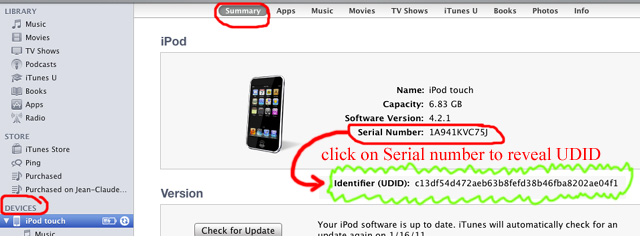
To participate to our beta testing, you'll need to enter your email adress to register to our newsletters. We'll also need your device ID to authorize our App to run on your Device.
To locate your Unique Device ID with iTunes 7.7 or later, follow these instructions: Connect your device to your computer and launch iTunes. In iTunes, select your device in the ‘Devices’ section and navigate to the Summary tab. Click on the Serial Number label to reveal the Identifier field and the 40 character UDID. Press Command+C (for Mac) or CTRL+C (for Windows) to copy the UDID to your clipboard. Use Command+V (for Mac) or CTRL+V (for Windows) to paste it back in the appropriate field.